


.png)

By Debargha Bhattacharjee | 24 August 2026 | ~8 Minute Read
Building a multi-agent recruiting pipeline on AWS, we found ourselves at the deployment stage and faced a familiar question: container-based path, or the newer direct code deployment that AWS now recommends? We chose the latter, and this post is our honest experience of that decision. AWS calls this feature direct code deployment. The CLI prompt labels it "Code Zip (recommended)," which is the shorthand we'll use throughout this post. That same agent leans on Bedrock's model compatibility layer to route requests across multiple providers, an approach we walk through in our piece on multi-provider agent orchestration on Bedrock.
A quick note before we start: Since AWS frequently ships updates to AgentCore, please keep in mind that this walkthrough reflects the workflow we used in late May 2026, and that you may notice small differences if you try it today.
The Old Way, and Why It Hurt
Before this feature existed, bringing an agent to AgentCore Runtime meant a stack of separate jobs that had very little to do with the agent itself. According to AWS's own description, the container path looked like this:
- Write a Dockerfile
- Build an ARM-compatible container image
- Create an Amazon ECR repository
- Upload the image to ECR
- Deploy to AgentCore Runtime
For teams who already had a container CI/CD pipeline, this was fine, even useful. For everyone else, it was four steps of containerisation overhead before the agent could even run. ARM64 builds on x86 developer laptops, image registry lifecycle, IAM for ECR, base-image patching responsibility, all of it sitting between the developer and the agent.
Direct Code Deployment: One Command, Four Things Happen
On November 4, 2025, AWS launched direct code deployment as a second path. The AWS Machine Learning blog calls it "Code Zip (recommended)" right in the CLI prompt, which is a small thing that says a lot about how AWS positions the two options. When you run agentcore deploy, four things happen in sequence:
- Package the agent code and dependencies into a .zip archive
- Upload it to an Amazon S3 bucket
- Build an ARM64 container image via AWS CodeBuild
- Register the new runtime with auto-patching enrolled
When we used the AgentCore starter toolkit, the first two steps were handled automatically. The toolkit detected our dependencies, packaged them, and uploaded them to a bucket it created for us. The remaining two stages, the ARM64 build and runtime registration, are handled by AgentCore itself. The first deployment took roughly 30 seconds. Subsequent updates were closer to 10 seconds, in line with what AWS reports.
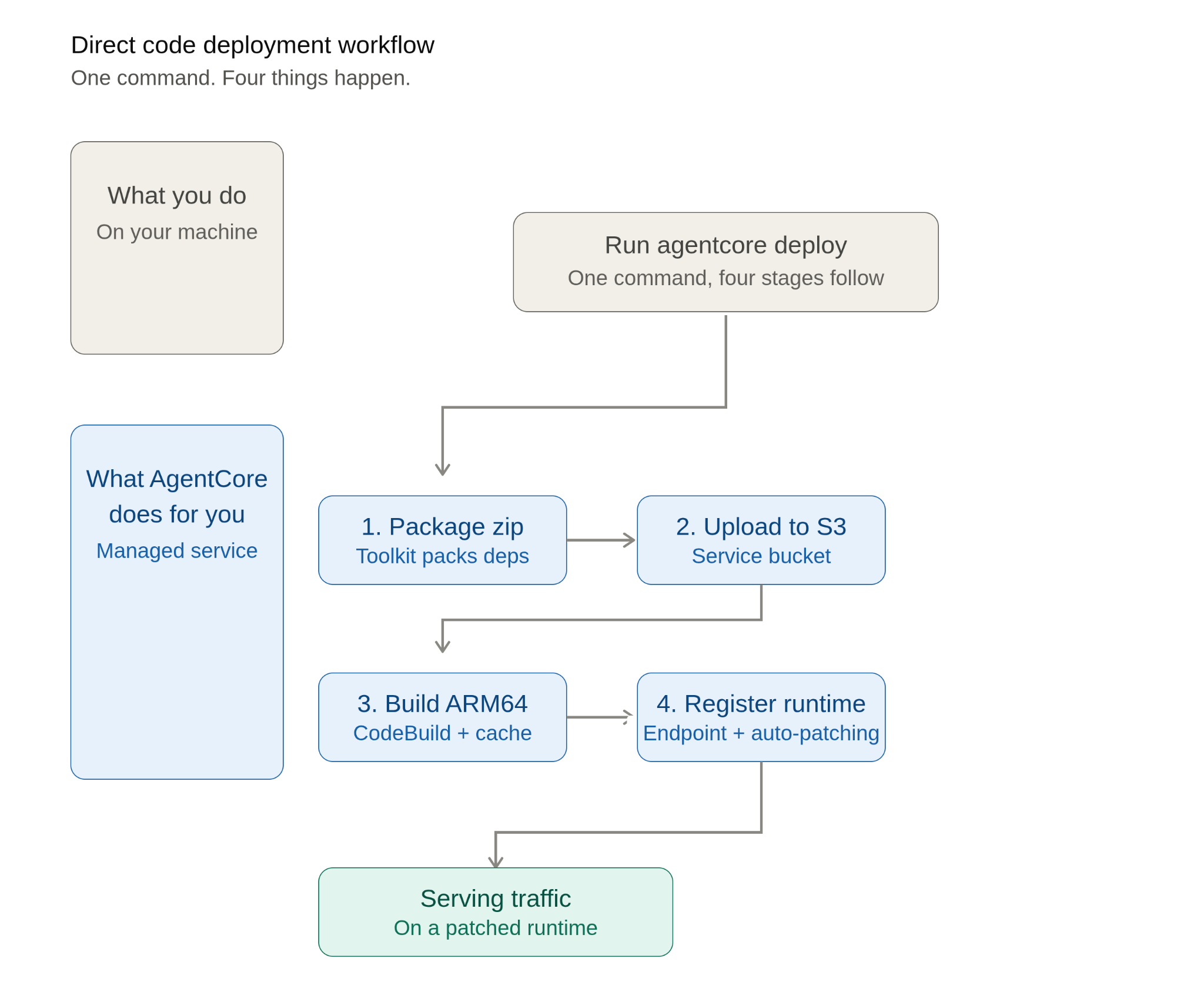
Let’s try to understand what happens under the hood:
- The entry code we write is the same as the one we use for either the CodeZip or the container path: the same BedrockAgentCoreApp object, the same @app.entrypoint decorator. In other words, choosing CodeZip is a deployment-time decision, not an architectural one. This allows for easy switching between the CodeZip and container-based approaches without needing to rewrite the agent.
- AgentCore automatically handles the ARM64 build for the users via CodeBuild. So, the architectural incompatibility headache vanishes, simplifying the deployment process for the end user.
When CodeZip Is The Right Default, and When It Isn't
On this question, AWS has published clear guidance on which approach to choose in any given situation. AWS says that the CodeZip path is the suitable default for most standard Python and Node.js agent projects. On the other hand, the container path is more suitable when any of the three conditions holds:
- Your package exceeds the CodeZip size limits: 250MB zipped or 750MB unzipped. Containers, by comparison, go up to 1GB to 2GB depending on which AWS source you read (the blog says 2GB and the dev guide currently says 1GB).
- You already have a container CI/CD pipeline you want to keep using.
- You have specialised system dependencies, multi-language requirements, or need direct control over artifact storage and versioning.
For us, none of those applied. The agent was Python, the dependencies were standard, and our priority was iteration speed. Therefore, CodeZip was the obvious choice.
Languages, Runtimes, and What's New
At the time of writing, the official AgentCore documentation lists that the following are supported:
- Python 3.10, 3.11, 3.12, 3.13, and 3.14 (all on Amazon Linux 2023)
- Node.js 22 (also on Amazon Linux 2023)
We should flag a few things about how AWS manages these runtimes:
- AgentCore Runtime automatically patches the language runtime for direct code deployments. The dev guide tells us that it is a shared responsibility model: AWS publishes new runtime versions with appropriate security patches and migrates your agent to them, while the end-user remains responsible for your application code and your own Python and Node packages. It is interesting to contrast this with the container-based deployment approach. Under the container path, AWS only patches the compute kernel. The base image lifecycle remains the end-user's responsibility. In our opinion, this patching-burden flip is often easy to miss, and the CodeZip approach makes it a real lifesaver for the user.
- The runtime architecture only supports ARM64 at present. The service rejects anything compiled for x86_64 at deployment time when it inspects the native binaries (.so for Python, .so and .node for Node.js).
Pricing: Pay-as-you-go, With One Small Storage Line
AgentCore Runtime is consumption-based. The pricing page specifically mentions that “you only pay for what you use” and “I/O wait is free”. If we consider AWS's estimate that 30 to 70 per cent of typical agent session time is I/O wait, then this pricing strategy doesn’t seem like a small detail in this context. Based on officially published rates, it costs $0.0895 per vCPU-hour and $0.00945 per GB-hour, with per-second billing and a 128 MB minimum for memory.
The CodeZip-specific cost is artifact storage. AgentCore simply stores the zip in a service-owned S3 bucket and bills it at standard S3 Standard rates. AWS’s own pricing example puts this at $0.0023 per month for a 100 MB agent, i.e., around two-tenths of one cent. In contrast, the container-based deployment charges Amazon ECR storage in your account at ECR’s standard rate. In our opinion, for most projects, the difference in artifact storage is too small to be a deciding factor.
New AWS customers also get up to $200 in Free Tier credits to spend on AgentCore, which is more than enough room to prototype a real agent end to end before any meaningful cost shows up.
Enterprise Readiness, Quietly Available
We were delighted that the CodeZip feature was not only meant for prototyping. The same path also works inside an enterprise security envelope. AgentCore runtime supports services such as Amazon VPC connectivity, AWS PrivateLink, AWS CloudFormation, and resource tagging. In other words, end-users can also use a CodeZip agent that supports talking to private databases and internal APIs via a VPC without internet exposure, defining the whole stack in CloudFormation and subsequently tagging it for cost allocation.
AWS made the CodeZip feature available in the following nine regions at the time of its launch in November 2025: US East (N. Virginia), US East (Ohio), US West (Oregon), Asia Pacific (Mumbai), Asia Pacific (Singapore), Asia Pacific (Sydney), Asia Pacific (Tokyo), Europe (Frankfurt), and Europe (Ireland).
Our Experience, Including the Gotchas
Once configured, the CodeZip path itself was as smooth as advertised. The iteration loop, edit, agentcore deploy, test, became something we could do many times an hour without thinking about it. That is genuinely a different experience from the container path.
We did hit three pieces of friction during the broader deployment, none of them caused by CodeZip itself but worth flagging so other teams can avoid the same time sinks:
- A CDK bootstrap KMS permission wall: Our deploying IAM principal needed additional KMS key permissions in the account where CDK had been bootstrapped. This is a CDK and IAM issue, not an AgentCore one, but it surfaced during our first deployment attempt and cost us a few hours.
- A 30-second container initialization timeout: In our initial setup, we had written the code so that the agent loaded configuration synchronously at startup. On a cold start, we noticed that this approach pushed us past the runtime's initialization window. As a fix, we had to move the configuration loading to lazy initialization on the first request. Consequently, the cold start finished quickly, and the work happened during the first invocation instead.
- An auto-created execution role that needed additional scoped permissions: The starter toolkit creates an IAM execution role for you, which is great as a default, but it does not know about every downstream resource your agent will touch. We added scoped permissions for the specific Bedrock model, S3 buckets, and Secrets Manager entries our agent needed, and the role worked from then on.
However, none of these would change our choice. They are the kinds of things any team deploying anything non-trivial to AWS will encounter at least once. We mention them because the post would feel dishonest without them.
Our Take
So, what’s our final take? Based on our experience deploying this application, we would suggest that people definitely try the CodeZip-based deployment path if they are building a standard Python or Node.js agent on Bedrock and don’t already have a strong reason for the agent to live in a container. Although AWS's CLI calls it recommended, our experience trying it on a real multi-agent project also shows it is beneficial: no infrastructure overhead, a faster iteration cycle, runtime patching, and minimal difference in cost compared to the container-based path.
If you ever feel that the container-based path is more suitable (e.g., you are working with a sizable application that has multi-language support and requires specialized dependencies, or already have a mature container CI/CD pipeline you don't want to replace), then you can easily switch to it. As we explained earlier in the blog, the entrypoint code is the same between the two paths, which we can easily reuse for container-based deployment. AWS itself recommends a hybrid model: use CodeZip for the standard case, and reach for containers when a specific production requirement demands them, whether that is a package size above 250MB zipped or 750MB unzipped, a runtime other than Python or Node.js, or a build process that needs a custom base image or non-standard system dependencies. In short, for a standard Python or Node.js agent, CodeZip is the default we would pick from day one, and the choice we would use as our starting point in production. If your team is weighing similar deployment decisions for your own agentic AI initiatives, Fission Labs' AI and ML engineering services team can help you move from prototype to production faster.
How Current This Is, and Where It Came From
Everything we have discussed in this blog reflects the AgentCore Runtime as of late May 2026. The direct code deployment feature, or CodeZip, launched on November 4, 2025. AWS added Node.js support later on April 29, 2026. Around the same time, on February 27, 2026, AWS started the S3 Standard storage billing. Since AWS is actively shipping updates to AgentCore, users must check the product, documentation, and pricing pages for the latest supported runtimes and languages, regions, and rates before proceeding with their builds.
All non-anecdotal claims above are sourced to the AWS pages linked in the next section. Where the AWS blog and the dev guide gave slightly different numbers (the container size cap, for instance), we cite both rather than pick one. Our hands-on observations and the three gotchas come from our own use of CodeZip while building a multi-agent recruiting pipeline, and were not pulled from any AWS source.
References
- AWS Machine Learning Blog: Iterate faster with Amazon Bedrock AgentCore Runtime direct code deployment (Nov 4, 2025)
- AWS What's New: AgentCore Runtime now supports direct code deployment (Nov 4, 2025)
- AgentCore Developer Guide: Direct code deployment concepts (shared responsibility, automatic patching)
- AgentCore Developer Guide: Supported language runtimes and deprecation policy
- Amazon Bedrock AgentCore Pricing (consumption-based, $0.0023/month per 100MB stat)
- AWS What's New: AgentCore Runtime now supports Node.js for direct code deployment (Apr 29, 2026)
- AWS What's New: AgentCore Runtime, Browser, and Code Interpreter add VPC, PrivateLink, CloudFormation, and tagging (Sep 25, 2025)
- AgentCore Starter Toolkit (used to generate the deployment package automatically)
- AgentCore Runtime Troubleshooting (ARM64 architecture requirements, common errors)